
How i build with AI

Custom Agents: I use AI to build custom internal agents that connect research, documentation, roadmaps, and design systems into a unified workflow layer with Claude, ChatGPT, Perplexity, and Copilot. These agents are tailored to specific product and business contexts, enabling teams to produce more consistent, scalable outputs while reducing friction across the design and development process.
Features & Experiences: I also use structured prompting systems, specifically the RTCCF framework, to translate internal design systems and product context into meaningful, repeatable design iterations. Through this approach, I was able to build an entire functional app through vibe coding, including SquareUp, a restaurant dashboard and check-splitting app. This system combines AI-assisted workflows with tools like Claude, Replit, Builder.io, and Figma Make to build full end-to-end experiences.
Custom Agents
TripAdvisor AI Agent “ollie”
The custom AI agent shown in the video was designed to support scalable cross-functional execution by consolidating research, product planning, and system dependencies into a single workflow. It was trained on internal UX research, product roadmaps (via Jira and Airtable), and the TripAdvisor design system, ensuring outputs stay grounded in real product constraints.
The agent helps teams proactively plan feature work by connecting what is being built to what already exists in the system, reducing ambiguity between design, product, and engineering and improving alignment across execution.
Where It Adds Value
Research Synthesis — Aggregates UX findings and customer insights into structured outputs
Roadmap Visibility — Surfaces project timelines, priorities, and dependencies across teams
Component Impact Mapping — Identifies affected design system components and templates
Documentation Intelligence — References existing product and design system documentation
Cross-Team Alignment — Improves collaboration between design, product, and engineering
Operational Efficiency — Reduces manual coordination and repetitive workflow overhead
Scalable Product Execution — Leverages existing data and systems to accelerate feature delivery
BUILDING Features & Experiences with AI
Squareup app
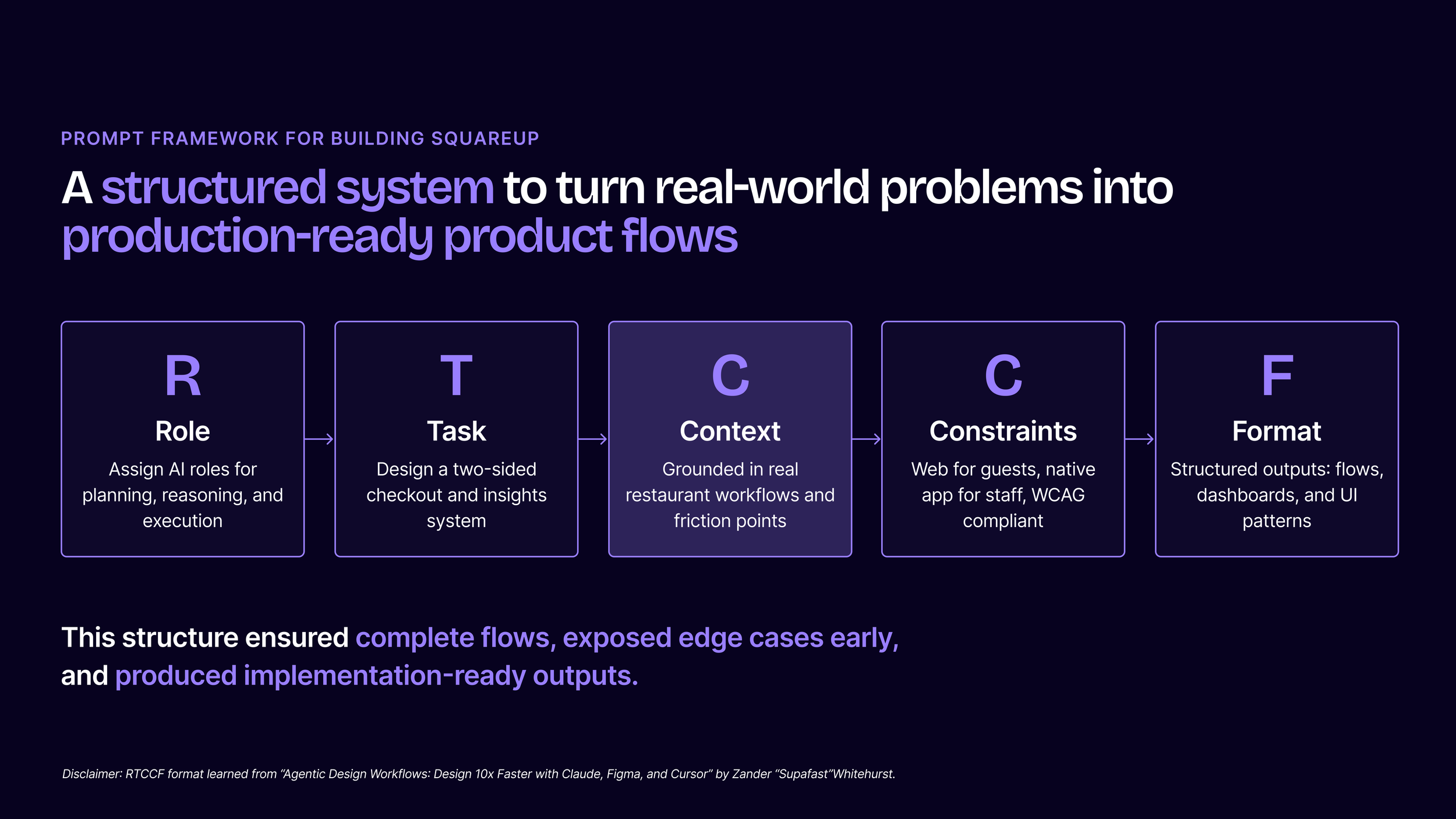
The prompt framework
I use a framework called RTCCF to create more reliable AI generations across product design, UX workflows, and full application experiences. Using this approach, I built a real working application called SquareUp for a restaurant to streamline the guest checkout process through QR-based payments while also giving management real-time visibility into nightly sales performance and operational insights. The system improves table turnover, reduces server workload, and provides actionable data that helps teams understand how the business is performing in real time.
Role — Defines the expertise and perspective AI should operate from
Task — Establishes the exact objective or workflow outcome
Context — Provides product, user, and business constraints
Constraints — Controls quality, structure, accessibility, and system rules
Format — Shapes how outputs are generated and organized
The image on the right shows my actual implementation of the RTCCF prompt format for this app at a high level.
The FINAL dESIGN
SquareUp was built as an exploration into how structured AI prompting and product context can accelerate production-ready product design workflows. The project reinforced a key principle when working with AI systems: context is everything.
Creating usable AI outputs requires far more than a simple prompt. To generate scalable, developer-ready experiences, prompts must be intentionally structured around real UX and UI foundations.
UI Context
AI outputs were guided using structured systems that defined:
Grid systems and spacing rules
Typography, color tokens, and design system constraints
Responsive behavior across screen sizes
Scalable component architecture
Accessibility and usability best practices
UX Context
Prompts were also tailored around user behavior and product strategy, including:
End-to-end user flows and journeys
User intent and decision points
Interaction patterns and feature logic
Research-informed UX frameworks
Clear action hierarchy and navigation structure
Workflow & Execution
Using structured prompting frameworks like RTCCF alongside tools such as Claude, Replit, Builder.io, and Figma Make, I was able to build SquareUp, a restaurant dashboard and check-splitting application.
These systems helped generate outputs that could move beyond ideation into production-oriented execution by:
Accelerating design iteration and feature exploration
Producing cleaner, more implementation-ready UI
Connecting outputs into Figma through MCP workflows
Supporting developer-ready design handoff
Reducing repetitive production overhead across workflows
EXPLORE SQUAREUP
1. Click the “Guest Demo” CTA.
2. Go through the flow as if you just received a restaurant check.
3. Choose your items, split the bill, or pay the full check.
4. Click the “See Staff Demo” CTA.
5. Explore the backend dashboard, including revenue tracking, labor costs, inventory updates, insights, and live sales reports.
The pitch deck
SquareUp started with a clear problem of simplifying restaurant operations and split payments into a faster and more intuitive experience. That opportunity was translated into structured user flows and a prompting framework grounded in UX principles.
Using structured prompts, I defined journeys, interactions, and UI logic before generating features. The result was a set of production-ready outputs including a restaurant dashboard, check-splitting flow, and intuitive payment experience.